Rate Limiting
1. Why rate limiting exists
Imagine your API has 1,000 users. One of them ships a bug: their script fires 50,000 requests in 10 seconds. What happens to the other 999? The server does not distinguish a bug, a bot, and a real user it just receives requests.
- A single runaway client floods the server.
- Queues fill → latency spikes → timeouts cascade.
- Legitimate users see
503 Service Unavailable.
| Concern | Effect |
|---|---|
| Availability | One bad actor can take the service down for everyone. |
| Fairness | One user can hog resources while everyone else starves. |
| Cost | No cap on requests often means no cap on your cloud bill. |
Most teams think about availability first. Many forget fairness. Almost everyone forgets cost until the invoice arrives.
Your system always has a maximum throughput it can sustain. Rate limiting is the choice to make that limit explicit and enforced instead of discovering it only through failure.
2. What rate limiting actually is
Rate limiting controls how many times a caller may perform an action in a time window, and rejects traffic above that threshold.
In three words: count, window, threshold.
Every rule has four parts:
| Variable | Question | Example |
|---|---|---|
| Key (who) | Who is limited? | user_id, IP, API key |
| Unit (what) | What are we counting? | HTTP requests, tokens, bytes, DB calls |
| Threshold (how many) | What is the max allowed? | 100, 1000, 10,000 |
| Window (when) | Over what period? | per minute, per day, per week |
"Allow user X   →         max 100 API calls            →  per minute"
 key = user_id     threshold = 100 | unit = API calls    window = 60s
If any part is missing, the rule is incomplete:
- No key → everyone is lumped together, often useless.
- No unit → ambiguous: requests, bytes, or something else?
- No threshold → there is no real limit.
- No window → you have a lifetime quota.
All four must be defined explicitly.
3. Algorithms
Fixed window
A fixed number of requests is allowed per fixed time window. A counter increments per request and resets when the window rolls.
- How it works: One counter per window, increment on each request, reset at window boundary.
- Boundary burst: There is a problem with Fixed Window, it allows you to request twice the defined limit near the end of a window you can send traffic, after reset you can send again so you can get up to 2x the nominal limit across the seam (e.g. 5 requests at t=59s, window resets at t=60s, 5 more at t=61s → 10 in ~2s with a 5/min rule).
- Example: GitHub's API uses a fixed window with
limit = 5000,windowDuration = 1h, aligned to wall-clock hours. - Use when: You want simplicity over perfect smoothness internal tools, coarse abuse prevention, clear user quotas.
Per-user window start: Instead of using a same(static) window for everyone, the window can start at the user's first request instead of the clock. That removes a shared "reset spike" but makes reset time harder for users to predict.
Sliding window
The limit is enforced over a moving time span instead of a single fixed block.
- Naive approach: Store a timestamp per request, count how many fall in the last N seconds. Accurate, but memory grows with traffic painful at scale.
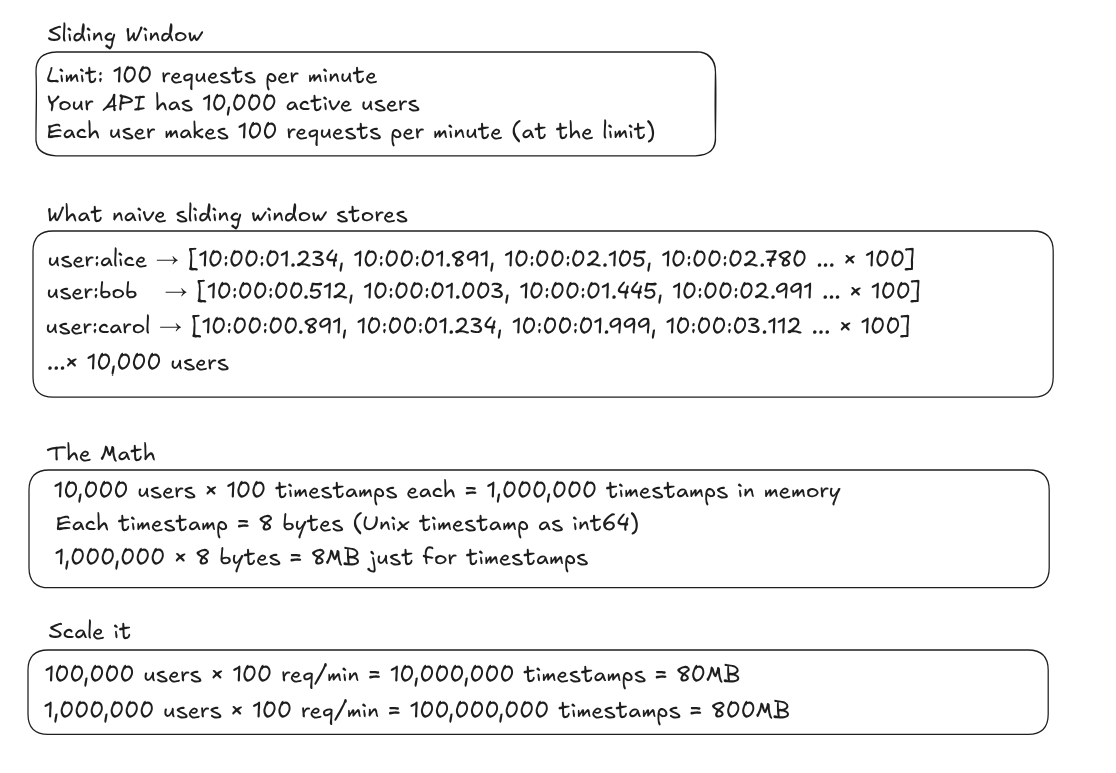
- Production approach: Most systems (Upstash, Cloudflare, etc.) use an approximation (floating window): keep two counters (previous window and current window), weight the overlap with current window and add. Same rough behaviour, far less storage.
Steps:
- Count allowed requests in the previous fixed window.
- Count allowed requests in the current fixed window.
- Weight the previous window by how much it overlaps a virtual window ending current.
- Sum weighted previous + current.
rate = (prevCount × prevWindowWeight) + currCount
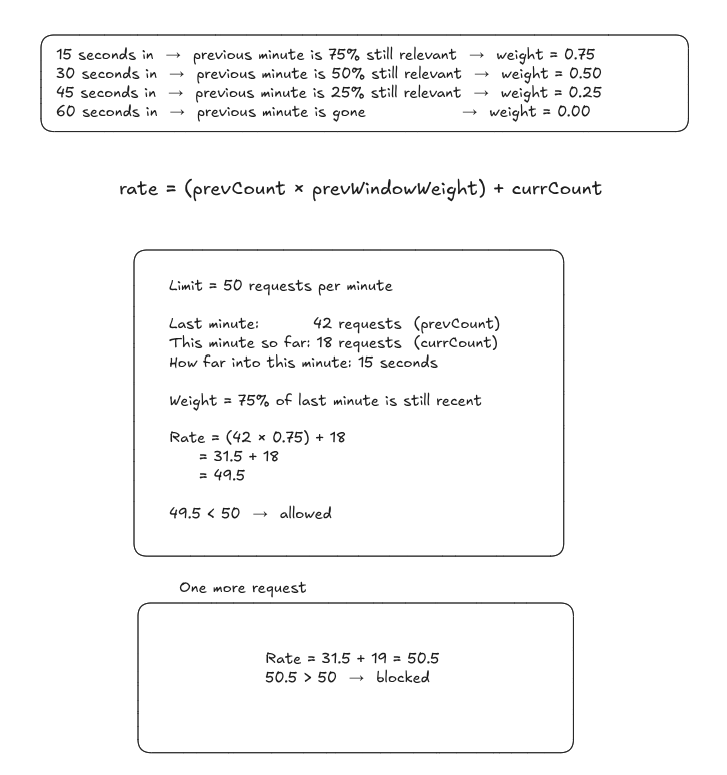
Blocking behaviour will not match the naive algorithm request-for-request, but long-run enforcement is usually close and the implementation scales. see real stats
Token bucket
A bucket holds up to capacity tokens. Each request consumes one token, tokens refill at a steady rate. Empty bucket → reject (or wait), depending on policy.
- Capacity → maximum burst size.
- Refill rate → long-term sustained throughput.
Example: Stripe uses a token bucket with limit = 500, refillInterval = 0.01s (~100 tokens/sec sustained, bursts up to 500). Implementation notes.
capacity       = 500 tokens
refillInterval = 0.01s  →  1 token / 10ms  →  100 tokens/sec

Burst:     spend up to 500 tokens at once
Sustained: refill caps long-term average at ~100/sec
Recovery:  empty → full in ~5s (500 / 100)
4. Algorithm comparison
| Aspect | Fixed window | Sliding window | Token bucket |
|---|---|---|---|
| How it counts | Counter resets at window end | Weighted mix of two windows | Tokens drain and refill |
| Memory | Very low (one counter) | Low (two counters + weights) | Low (capacity + refill state) |
| Burst behaviour | Up to ~2× at boundaries | Smoother | Bursts explicit via capacity |
| Accuracy | Lower | High (approx.) | High |
| Hard part | Boundary burst | Getting weights right | Tuning capacity vs refill |
| Seen in | GitHub | Cloudflare, Upstash | Stripe, OpenAI |
| Pick when | Simplicity first | High traffic, smooth limits | Predictable bursts + sustained cap |
5. Real-world design
Rate limiting vs load shedding
They solve different problems:
- A rate limiter looks at the caller: "Is this user or client sending too much?"
- A load shedder looks at the system: "Is this machine or fleet healthy enough to accept this work?"
Stripe's four layers
Stripe runs several limiters at once. Four ideas that show up in their writing:
-
Request rate: "You can only make N requests per second." Often the first layer you build. Stripe uses the same limits in test and live mode so dev scripts do not "work in dev, explode in prod."
-
Concurrent requests: "You can only have N requests in flight." Not the same as RPS: slow endpoints mean users stack overlapping calls and overload a hot resource even when each call is "within rate."
-
Fleet load shedding: "Reserve capacity for critical traffic." Under strain, critical work (e.g. charges) gets a guaranteed slice; non-critical work (lists, analytics) can be dropped with
503when it exceeds its share.
Critical     →  charges, money movement, core flows
Non-critical →  lists, analytics, reporting, exports
- Per-worker shedding: "If this host is drowning, drop least important work first." Example tier: test traffic → GETs → POSTs → critical methods last.
Shed slowly: sudden toggles cause oscillation and harder incidents than the original overload.
Test traffic   ← shed first (lower blast radius)
GETs           ← then reads
POSTs          ← then writes
Critical paths ← never shed if possible
OpenAI: multiple limits at once
Many products expose one knob. OpenAI exposes several in parallel (e.g. requests per minute/day, tokens per minute/day, images per minute). Whichever you hit first wins they are independent guards.
RPM - requests per minute
RPD - requests per day
TPM - tokens per minute
TPD - tokens per day
IPM - images per minute
Requests and tokens measure different costs: a request is a network and concurrency unit; a token is compute. A single huge request might pass an RPM check but fail TPM. Designing limits for both closes gaps a single metric would miss.
References
Cool visualization of algorithms
stripe's implementation
Cloudflare's limiter scaling to millions
Figma's approach to rate limiting